Error Code OverviewUpdated 4 months ago
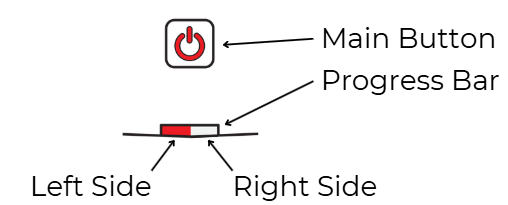
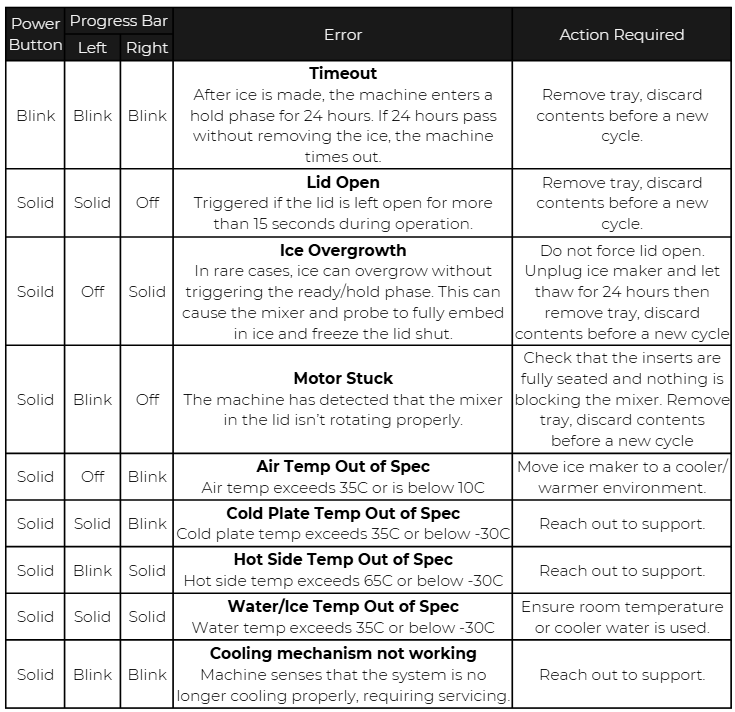
Errors - If an error occurs during a cycle, the main button will turn red. The progress bar will light up a combination (left/right, solid/blinking/blank) of red to communicate the error code. Note the combination for reference against the error table below and/or for communication with support. Machine will turn off the cooling mechanism and mixer and any ice in the tray will begin to melt.
To clear an error:
- Note the error code and review the corresponding description in the error table. Determine the action needed.
- Open the lid and remove the tray from the machine and empty its contents. If the lid is difficult to open, unplug the machine and let it thaw for 24 hours before retrying. If the tray is difficult to remove, unplug the machine and let it thaw for a few minutes before retrying.
- CAUTION: If the tray is not removed and emptied of its contents after an error, ice overgrowth could occur in the next cycle, potentially damaging the machine. Ice overgrowth is defined as ice that has formed higher than designed for machine use.
- Pressing the main button will advance the machine to the idle state.